6564 - Radiant and All Nexus: How to reserve certain pin or pins without any logic in the design?
Description:
In planning for a design, ports and pins are should be set earlier prior to adding logic in the design, and reserving a pins without any logic is part of that hardware abstraction.
Solution:
Procedure to reserved certain pin or pins.
1. Go to DCE (Device Constraint Editor).
2. Look for the graphical package view of all the pins.
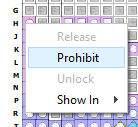
3. Right click on the desired pin.
4. Then choose "Prohibit".
5. Save the changes.
6. The constraint will be added to PDC.
PDC file content: ldc_prohibit -site H26
PDC file content: ldc_prohibit -site H26
The user can also opt to directly write on the PDC by using the "ldc_prohibit" constraint.
Usage: ldc_prohibit –site site OR ldc_prohibit –region region
Options: site: site name, region: region name
Then, check the signal/pad report under PAR to check if the reserved pin is accepted.
Pinout by Pin Number:
+----------+-----------------------+------------+--------------+-----------------+---------------
| Pin/Bank | Pin Info | Preference | Buffer Type | Site | Dual Function |
+----------+-----------------------+------------+--------------+-----------------+---------------
H26/7 | Prohibited/Reserved | PROHIBITED | | PL6A | EIO
The information is also added on the "Attribute" tab of DCE and the Physical Designer pin info.

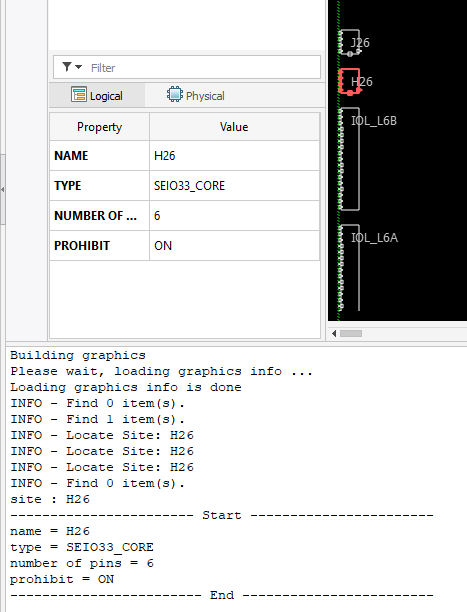
The information is also added on the "Attribute" tab of DCE and the Physical Designer pin info.